
Phone-Photo to Studio Render: How Google Nano Banana Pre-Processes Every Upload
By AirisJus · Published
Most furniture photos are bad — bad lighting, cluttered backgrounds, off-angle. We added Google's Nano Banana model as a pre-processing step to fix that before the 3D engine ever sees the image.

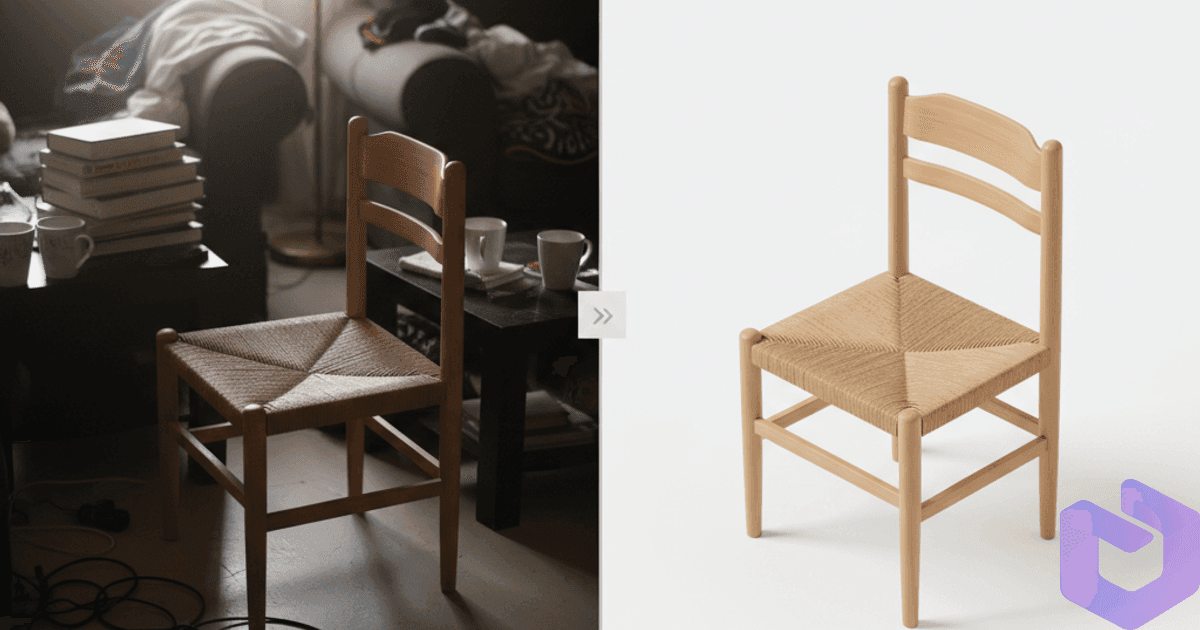
The input photo matters more than people realize
For two years we focused on making our 3D generation engine better. We measured progress in mesh quality, in texture sharpness, in how well the model captured a chair's specific geometry. What we slowly realized: most of the time, when a user said "the result looks wrong," the bottleneck wasn't the engine. It was the photo we fed it.
Most furniture photos are phone snapshots. Bad lighting. Cluttered backgrounds. Off-angle perspective. A side table half-hidden behind a sofa. A chair photographed in your storage room with fluorescent overheads. The engine is doing its best with the input it gets — and the input is doing it no favors.
So we built a fix. Google's Nano Banana model (formally gemini-2.5-flash-image) now runs as a pre-processing step on every upload before our generation engine ever sees it.
What it does
Nano Banana takes your raw photo and transforms it into a clean, isometric, studio-lit render of the same object on a pure white background — before it goes into the 3D pipeline.
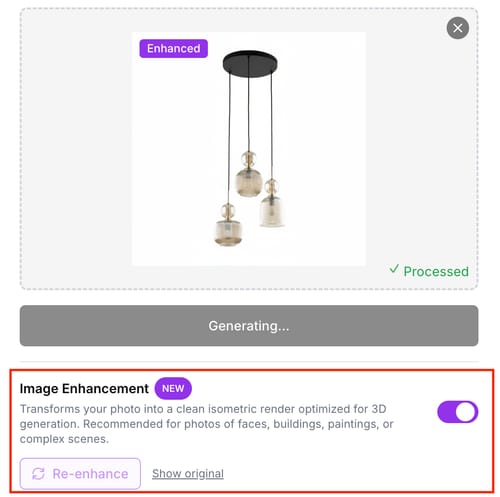
This isn't a generic image upscaler. It's a photo-to-isometric-product-render transformer. It identifies the main subject (the chair, the table, the lamp), strips out everything else, normalizes the lighting to soft directional studio light, and re-renders the object at a consistent 30-degree isometric viewing angle.
The downstream 3D engine then sees something that looks like it was photographed in a product studio — and produces results closer to studio-shoot quality.
The full pipeline
You upload a photo
Any angle, any background. Phone shots, screenshots from a catalog, photos from a furniture trade show — all fair game.
Nano Banana transforms it
Google's image model identifies the primary object, removes the background, normalizes lighting, and re-renders it at a 30-degree isometric angle on white. This takes 3-5 seconds. You don't see it happen — it's a step inside the generation flow.
FurniMesh V2 generates the mesh
Our V2 engine consumes the clean render and produces the 3D geometry. Because the input is now consistent and free of distractions, the output is dramatically more accurate.
Textures get baked
At 1024p (standard) or 1536p (Premium/Pro). PBR materials, real metalness/roughness maps, not just diffuse colors.
You download
GLB for the web and AR. OBJ for any generic 3D tool. SKP for SketchUp. BLEND for Blender. All four are produced from the same source — no format conversion penalty.
Three scenarios where this shines
Low-light photos. Your warehouse, your storage room, a friend's apartment at dusk. Nano Banana normalizes the lighting so the generation engine sees a well-lit object regardless of what your phone captured. We've seen 60-70% quality improvements on dim photos.
Cluttered backgrounds. The showroom floor with three other chairs visible. Your living room with a TV, a rug, and a coffee table behind the subject. The pre-processing isolates the chair and discards the rest. This is the biggest single quality unlock for casual users.
Off-angle shots. The photo you took because the perfect angle wasn't physically possible — over the back of a chair pushed against a wall, or from below because the chair was on a podium. Nano Banana re-projects to a standard three-quarter isometric view that the 3D engine handles cleanly.
Try one of your messy phone photos → it should work better than you expect
What the enhancement won't fix
Honest framing. Three cases where pre-processing has its limits:
- Heavily-occluded photos. If half the chair is hidden behind a couch, Nano Banana has to guess what's there. Sometimes it guesses well; sometimes it produces a chair with three legs.
- Multiple subjects in one frame. Two chairs, a chair and a side table, a sofa with throw pillows you want as separate models. The pre-processing picks one subject. If you want both, upload two photos.
- Extreme perspective distortion. A shot from directly above or directly below normalizes worse than a three-quarter view. The pre-processing helps but can't fully recover a top-down photo into a usable isometric view.
These are edge cases. The vast majority of furniture photos — even bad ones — now produce results worth shipping.
Another V2 example, post-enhancement
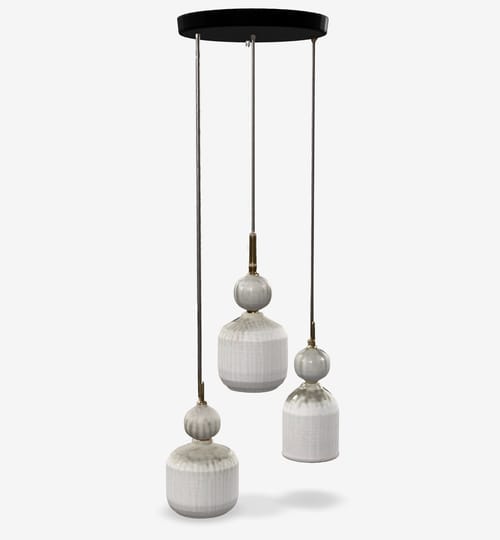
The original input for this one was a phone photo taken on a cluttered showroom floor with mixed lighting. After Nano Banana enhancement, the V2 engine produced this. We're not airbrushing the workflow — this is a representative sample from real production traffic.
Technical FAQ
How much slower does my upload get? 3-5 seconds of additional processing. The Nano Banana call runs in parallel with our initial image validation and upload steps, so the wall-clock impact on a typical 45-second generation is around 5-10%.
Can I disable it? On the standard one-click generator, no — it always runs because it's net-positive on quality across the input distribution we see. On Advanced Generation, you can skip the enhancement and feed the raw photo directly to the engine. Useful if you've already cleaned up your photo in Photoshop.
Where does Google process my image? Vertex AI in us-central1. Per Google's Vertex AI policy, customer inputs are not used to train Google's foundation models. The image is processed, returned, and not retained.
What if Nano Banana misidentifies the subject? Rare but possible — usually when a photo has two similar-sized objects. The retry mechanism in our pipeline catches the most common failure modes and falls back to the raw photo if the enhanced output looks degenerate.
Generate from any photo →
More Articles
Displaying 3D Models in Your Website with AR Functionality using Furnimesh
Learn how to seamlessly embed FurniMesh 3D models in your website and leverage powerful AR capabilities for an enhanced customer experience.
April 25, 2025
Engine V2: How Our New 3D Pipeline Renders Curves, Glass, and Fine Detail
The April 2026 V2 engine release is the biggest geometry upgrade in FurniMesh's history. Sharper textures, smarter mesh topology, and complex shapes that used to be failure cases now render cleanly.
April 10, 2026